


RANT Casino Login & Registration Guide for New Player
If you are thinking about joining RANT Casino, getting set up is quick, simple, and 100% online. Let us walk you through RANT Casino registration, login, verification, and what to do if anything goes wrong along the way.
Getting Started with RANT Casino
You can start your RANT Casino journey from desktop or mobile, and everything begins with the “Join Now” or “Registration” button in the site header. From there, you are guided through a short two-step form where you create your login details and add basic personal info needed for security and KYC.
Once your account is created, we immediately send you a confirmation email, and sometimes an SMS code, to verify that the contact details you entered are actually yours. After activation, you can log in, head to the Cashier, and grab your welcome bonus.
How to Register at RANT Casino
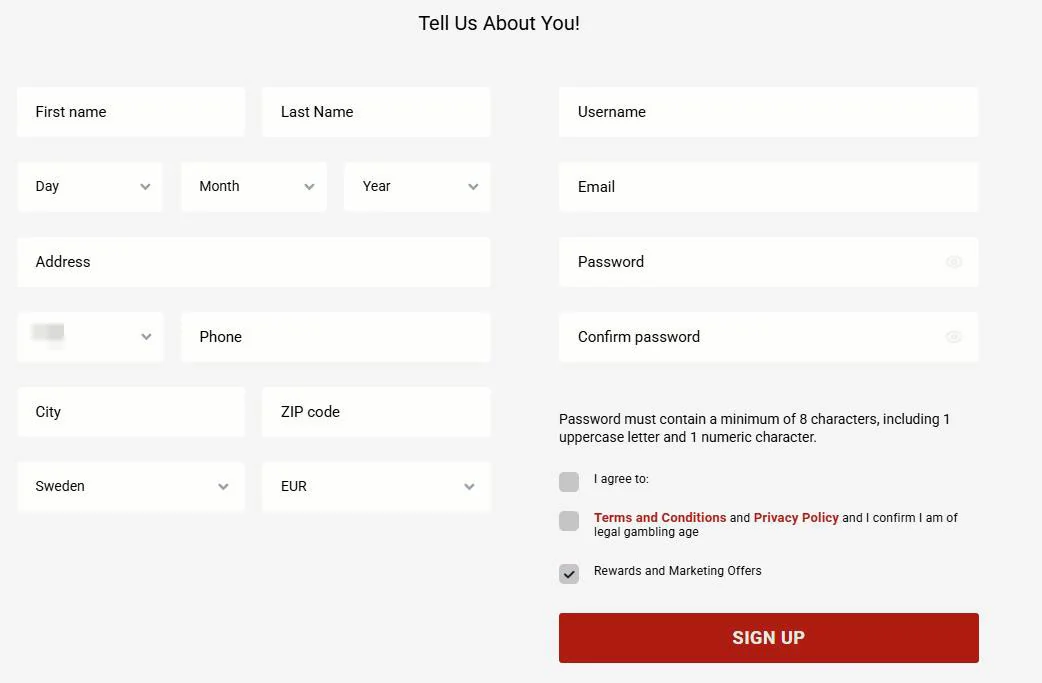
You will only need a couple of minutes to sign up, and you can do it all in one sitting. Let us break it down into the three key parts you will see on screen.
Creating Your Account
On the registration page, you first create your basic RANT Casino login details: a unique username, a valid email, a secure password, and your chosen currency. There is also a phone number field for SMS verification, plus checkboxes for the RANT Casino terms, privacy, and whether you want to receive marketing offers.
In the next step, you add your personal profile info, like first and last name, date of birth, address, city, ZIP code, and country. You must confirm you are at least 18 (or higher if your jurisdiction requires it) and accept the Terms and Conditions before we can create your account.
Key registration fields at RANT Casino:
| Step | What you enter | Why do we need it |
| Login details | Username, email, password, currency | Sign in securely, set up your account |
| Contact details | Phone number, marketing preferences | SMS verification, RANT Casino promos |
| Personal info | Name, DOB, address, city, ZIP, country | KYC checks, security, compliance |
After you submit the form, you will see a confirmation that your account has been successfully created and that an activation email has been sent. If you registered at RANT Casino via mobile, you may also see a message asking you to check your SMS.
Email Verification Process
Right after RANT Casino registration, we send a confirmation email to the address you used when signing up. Inside that email, there is an activation link that you need to click before you can fully access your account and play.
If the email is not in your inbox, check the spam or junk folder and use the “Didn’t receive email yet?” option on the site to resend if needed. Without this activation step, you can not finish the RANT Casino login process properly, and some features will stay locked.
KYC Verification Requirements
KYC (Know Your Customer) is a standard security check where we confirm your identity and address. In your profile or Cashier, you will see KYC buttons like “Verify ID” and “Verify address”, along with your current KYC status (Pending, Validated, or Blocked).
To complete KYC, you typically need to upload a photo or scan of your ID (passport, national ID card, or driving licence) and a proof of address, such as a utility bill or bank statement. More payment methods and full withdrawal access become visible once your documents are verified.
RANT Casino Login Process
Logging in is even faster than registering at RANT Casino, and you can do it from any device as long as you have your username and password ready. If anything does not work, RANT will show a clear message so you know what to fix, like “Invalid username or password” or “Account pending activation”.
Logging In on Desktop
On the desktop, you will find the “Login” button at the top right of the RANT Casino site, opening a compact sign-in form. There, you enter your username and password, then hit “Login” to access your account and the RANTCasino game lobby.
If you do not have an account yet, you can click “Click here to create one” or “Join Now” from the same area. If you forgot your password, there is a “Forgot password?” link right below the fields that sends you to the recovery page.
Mobile Login Experience
On mobile, you open the main menu icon and choose “Sign In” to bring up the same username and password fields, just adapted for small screens. The layout is optimised so you can log in with your thumb, and once you are in, you can navigate between games, promotions, and Cashier just like on a desktop.
Mobile pages also highlight the welcome banner and “Join now and claim a welcome bonus” message, so new players can jump straight into registration if they landed on RANT from their phone. Everything, including RANT Casino verification and password recovery, works from mobile as well.
Username and Password Management
During registration, you pick a unique username and a strong password that follows our rules: at least 8 characters, including at least one capital letter, one number, and one symbol. The system will reject simple or weak passwords and show an error like “Password must contain at least one capital letter, number, and symbol”.
You can change your password later from the “Change Password” section in your profile, as long as you enter the old password correctly and make sure the new one meets the same security requirements. Email changes also need confirmation via a link sent to your new email address.
Account Recovery and Password Reset
If you lose access to your RANTCasino login details, you do not need to panic. We have several ways to help you get back in. Everything starts from either the login pop-up or the dedicated password recovery pages in the site header.
Forgot Password Options
When you click “Forgot password?”, you are taken to a recovery form where you can enter either your username or email. RANT Casino sends a password reset link to the email attached to your account, letting you set a fresh password that meets our complexity rules.
If the RANTCasino login attempt fails, you might see messages like “Invalid Username or Password!”, “Password reset link has been sent to your email,” or “Password change link expired! Please request a new one!” When links expire, you just repeat the process and request a new one.
Account Security Tips
To keep your RANT Casino account safe, we strongly recommend a unique password that you do not reuse on other sites. Avoid including your username or email in the password, as the system can flag that as invalid.
You can also set deposit, bet, and loss limits from the Limits section of your profile, which indirectly improves security and responsible play. If you ever suspect someone else has accessed your account, change your password immediately and contact support.
Troubleshooting Login Issues
Now, if your RANTCasino login does not behave as expected, the messages on screen usually point you in the right direction. Here are some of the common issues and what they mean:
- “Invalid username or password!” You entered something incorrectly. Check the caps lock and spelling.
- “Account is unactivated.” You need to click the activation link in your email first.
- “Your account has been locked. Please reset your password to open it again.” Too many failed attempts, use the RANT Casino password reset option.
- “This account is frozen” or “This account is deactivated!” The account is limited, usually after a self-exclusion or by support, so you must contact our team.
- “Login from this country is restricted,” or “We do not operate in this market.” Your region is not allowed to play, so access is blocked based on IP.
If the message just says “System Error! Contact customer support for help”, that is on us, not you, and our live chat or email team can look into it.
Conclusion
Bottom line, registering and logging in at RANTCasino is designed to be fast, clear, and secure, with on-screen hints at every step. Once you are set up, verified, and logged in, you are only a couple of clicks away from grabbing your welcome bonus and diving into the games.